

Quick Answer
A contractor management workflow process is a structured sequence of steps — from sourcing and vetting through to offboarding — that governs how a business engages, manages, and closes out its contractor relationships. An effective workflow reduces compliance risk, accelerates onboarding, and gives you complete visibility over every contractor at every stage.
Contractors run your projects. But who runs your contractors?
For most businesses, the honest answer is nobody—at least not systematically. Contracts sit in email threads.
Compliance documents expire unnoticed. Renewal decisions happen at the last minute or not at all.
That’s not a minor administrative gap. It’s a liability.
Misclassified contractors, missed contract renewals, and undocumented access provisioning are the kinds of issues that generate audits, lawsuits, and reputational damage.
This guide provides the complete contractor management workflow, from initial vetting to final offboarding.
You’ll learn what the stages look like, where most businesses break down, how to build the process from scratch, and what tools actually support it at scale.
Remire, the global HR platform, has put this together based on real patterns we see across hundreds of businesses that manage contractors worldwide.
What Is a Contractor Management Workflow Process?
A contractor management workflow process is the end-to-end sequence of steps a business uses to source, engage, manage, and exit contractors.
It covers everything from the moment you decide you need a contractor to the moment their access, contract, and obligations are formally closed.
A real contractor management workflow connects people, documents, approvals, compliance checks, and systems into a repeatable, auditable process. It works whether you’re managing 5 contractors or 500.
Think of it as the operating system for your contingent workforce. Without it, every contractor engagement becomes a one-off scramble. With it, every engagement follows a consistent, defensible path.
Who Owns the Contractor Management Workflow?
Ownership depends on your organization’s structure — and many businesses get this wrong by defaulting to a single team. In practice, the contractor management workflow process spans multiple stakeholders:
- Procurement / Legal: Owns sourcing criteria, contract templates, and negotiation authority.
- HR and People Ops: Owns onboarding, classification compliance (IR35, 1099, etc.), and offboarding.
- IT and Security: Owns access provisioning and revocation at the system level.
- Finance: Owns payment terms, invoice validation, and cost tracking.
- Line Managers: Own day-to-day performance oversight and delivery quality.
The most effective contractor workflows assign a clear process owner, usually in Operations or Procurement, who coordinates across these teams without duplicating effort.
What Are Common Challenges in Contractor Management?
Before you can fix your contractor management workflow, you need to understand where it breaks. These aren’t edge cases; they’re structural failures that appear in businesses of every size.
1. Lack of visibility
Contractors are often tracked across multiple systems (HRIS, finance, project tools), making it difficult to get a single, accurate view of who is active, compliant, or offboarded.
2. Poor compliance tracking
Expired contracts, missing documents, and outdated certifications often go unnoticed without automated reminders and structured checks.
3. Manual administrative workload
Contract creation, approvals, timesheets, and renewals are often handled manually, creating delays and increasing operational overhead.
4. Approval bottlenecks
Single approvers, unclear delegation, and lack of escalation rules slow down onboarding and contract execution.
5. Data inconsistency
Different systems may store contractor details differently, leading to duplication, reporting errors, and reconciliation work.
6. Onboarding and offboarding delays
Access provisioning and removal often depend on manual coordination between HR, IT, and operations teams.
7. Cross-border compliance complexity
Different jurisdictions introduce varying labor laws, tax rules, and classification requirements, increasing risk in global teams.
How Does Contractor Management Impact Project Success?
Poor contractor management does not just slow projects down — it derails them.
When contracts are unclear, payments are delayed, or compliance is ignored, contractors disengage fast. And unlike full-time employees, they have no reason to wait it out.
Structured contractor management keeps expectations aligned, payments on time, and compliance airtight. That consistency is what turns a group of independent workers into a team that actually delivers.
The 7 Stages of a Contractor Management Workflow Process
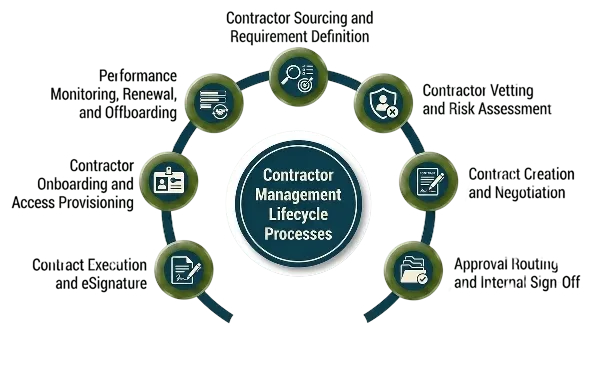
Here are the seven core stages of an effective contractor management workflow.
Stage 1: Contractor Sourcing and Requirement Definition
Every contractor engagement starts with identifying a business need. Teams define the required skills, project scope, expected duration, budget, and deliverables before searching for talent.
Depending on the organization, contractors may be sourced through:
- Approved vendor networks
- Staffing partners
- Freelance marketplaces
- Internal referrals
- Direct applications
Companies hiring internationally should also evaluate country-specific regulations before engagement begins.
Businesses working with distributed teams often use platforms like Remire’s global hiring solution to streamline compliant cross-border hiring workflows.
Stage 2: Contractor Vetting and Risk Assessment
Once potential contractors are identified, organizations conduct due diligence before moving forward.
The vetting process typically includes:
- Identity verification
- Right-to-work validation
- Tax classification checks
- Background screening
- Insurance verification
- Portfolio and reference checks
Risk assessment is especially important for contractors handling confidential information, customer data, or critical infrastructure access.
Businesses managing remote or international contractors often implement formal background check workflows. It helps them in reducing legal and operational risk before onboarding begins.
Stage 3: Contract Creation and Negotiation
After vetting, the organization prepares a contractor agreement that defines the working relationship clearly.
The contract should outline:
- Scope of work
- Payment terms
- Deliverables
- Confidentiality obligations
- Intellectual property ownership
- Liability clauses
- Termination conditions
Many businesses use standardized templates to speed up contract generation while still allowing limited customization for project-specific requirements.
During this stage, contractors may negotiate certain clauses such as payment schedules, notice periods, or liability limitations.
Stage 4: Approval Routing and Internal Sign-Off
Before execution, the contract typically moves through an internal approval workflow.
Approvals may involve:
- Procurement teams
- Department managers
- Finance teams
- Legal departments
- Compliance officers
The approval path often depends on:
- Contract value
- Contractor location
- Risk level
- Data access permissions
- Engagement duration
Organizations with mature contractor management systems usually automate escalation rules to prevent delays caused by stalled approvals.
Stage 5: Contract Execution and eSignature
Once approvals are complete, both parties formally execute the agreement.
Using eSignature platforms helps organizations:
- Reduce turnaround time
- Maintain secure audit trails
- Track document versions
- Store signed agreements centrally
At this stage, the contractor engagement becomes legally active, and onboarding activities can begin.
Stage 6: Contractor Onboarding and Access Provisioning
A structured onboarding process ensures contractors can begin work without unnecessary delays.
Onboarding commonly includes:
- System and tool access setup
- Security and compliance training
- NDA acknowledgment
- Tax and payment documentation
- Introduction to internal stakeholders
- Project workflow orientation
Research consistently shows that structured onboarding improves contractor productivity and reduces operational confusion.
Many global teams now follow standardized best practices for onboarding contractors to improve Day-1 readiness and accelerate delivery timelines.
Stage 7: Performance Monitoring, Renewal, and Offboarding
Contractor management continues throughout the engagement lifecycle.
Businesses should monitor:
- Deliverables
- Milestones
- Invoice approvals
- Compliance status
- Contract expiry dates
As the contract approaches expiration, organizations decide whether to:
- Renew the engagement
- Extend the contract
- Transition the contractor
- Complete offboarding
A structured offboarding process should immediately revoke system access, recover company assets, and document project completion to reduce security and compliance risks.
How to Build a Contractor Management Process from Scratch
Building a contractor management process from scratch requires more than documenting a few onboarding steps.
Organizations need a scalable framework that standardizes approvals, embeds compliance controls, and supports contractor engagements across departments and regions.
Here’s a practical framework businesses can use to create a contractor management process from the ground up.
Step 1: Define Ownership and Governance Structure
Before implementing workflows or software, clarify who owns each part of the contractor lifecycle.
This includes identifying:
- Request initiators
- Hiring managers
- Procurement owners
- Legal reviewers
- Compliance teams
- Finance approvers
- IT and security stakeholders
Many organizations create a RACI matrix to define who is responsible, accountable, consulted, and informed at every stage of the process.
Without governance clarity, contractor workflows often become inconsistent and difficult to scale.
Step 2: Categorize Contractors by Risk and Engagement Type
Not every contractor should move through the same workflow.
Businesses should classify contractors based on factors such as:
- Access to sensitive systems
- Geographic location
- Contract value
- Engagement duration
- Regulatory exposure
- Data handling responsibilities
For example, a freelance graphic designer may require minimal compliance checks, while a cybersecurity contractor working with production systems may require extensive reviews and approvals.
Risk-based categorization helps organizations apply the right level of oversight without slowing down low-risk engagements unnecessarily.
Companies managing international teams often build dedicated contractor compliance frameworks to standardize risk controls across countries and jurisdictions.
Step 3: Standardize Contracts and Documentation
To reduce legal delays and operational inconsistency, organizations should develop standardized contract templates for different contractor categories.
This often includes:
- Freelancer agreements
- Agency contracts
- Subcontractor agreements
- Technical consultant contracts
Core legal clauses should remain fixed, while project-specific sections remain customizable within approved boundaries.
Organizations should also standardize:
- NDAs
- Compliance forms
- Insurance requirements
- Tax documentation
- Onboarding checklists
A centralized document framework improves consistency and accelerates onboarding timelines.
Step 4: Design Workflow Rules and Approval Logic
Once governance and documentation are defined, businesses can build the actual workflow structure.
This includes:
- Approval sequences
- Escalation rules
- Notification triggers
- SLA timelines
- Compliance checkpoints
- Renewal workflows
For example:
- High-value contracts may require finance and legal approval
- International contractors may trigger tax and classification reviews
- Delayed approvals may escalate automatically after 48 hours
Clear workflow logic prevents bottlenecks and improves operational visibility across teams.
Step 5: Embed Compliance Controls Into the Process
Compliance should be integrated into every stage of the contractor lifecycle rather than treated as a one-time review.
Organizations should build checkpoints for:
- Worker classification validation
- Right-to-work verification
- Insurance compliance
- Data protection acknowledgment
- Security training completion
- Access audits during offboarding
Each action should generate a documented audit trail to support regulatory and legal requirements.
Step 6: Implement Automation and Centralized Tracking
Manual contractor management processes quickly become difficult to manage at scale.
Organizations should implement systems that automate:
- Approval routing
- eSignature collection
- Renewal reminders
- Contract expiration alerts
- Offboarding triggers
- Audit logging
Centralized tracking improves visibility across active contracts, pending approvals, compliance status, and contractor performance.
Step 7: Create a Structured Renewal and Offboarding Framework
Many contractor management failures happen at the end of engagements because renewals and offboarding are handled reactively.
Businesses should establish the following:
- Automated renewal reminders
- Contract expiry notifications
- Offboarding checklists
- Access revocation procedures
- Equipment return processes
- Final invoice verification steps
A proactive end-of-engagement framework helps reduce compliance gaps, security risks, and operational disruption.
What Broken Contractor Management Workflows Actually Cost Your Business
The cost of a broken contractor management process isn’t theoretical. It shows up in real line items, penalties, delays, litigation, and talent attrition. Here’s where the damage lands.
The Compliance Risk No One Talks About: Misclassification and Audit Exposure
Worker misclassification is the highest-stakes risk in contractor management.
If your workflow doesn’t have an explicit classification step with documented reasoning, you’re exposed. In the UK, IR35 determinations carry back-tax liability.
In the US, misclassifying an employee as a 1099 employee can trigger penalties from the IRS and state labor authorities. In the EU, platform worker regulations are tightening further.
The financial exposure isn’t just the back taxes. It’s the legal costs, the reputational damage, and the disruption to ongoing contractor relationships when a determination changes mid-engagement.
Revenue Leakage from Delayed Approvals and Missed Renewals
A bottlenecked approval process doesn’t just slow things down; it costs money. Contractors who can’t start because approvals are stuck cause project delays.
Projects that can’t deliver on schedule create commercial penalties or client dissatisfaction.
Contracts that auto-expire because nobody set a renewal reminder create gaps in resource coverage that are expensive to backfill quickly.
Cost Alert
Industry data consistently shows that manual contractor approval processes take 3–5x longer than automated workflows. Every extra day of delay in a contractor engagement has a direct cost: idle project capacity, extended timelines, and, in some cases, penalty clauses activated by missed milestones.
Reputational Risk: What Slow Contractor Onboarding Signals to Top Talent
The contractor market is competitive. Experienced contractors have choices.
When your onboarding process is slow, confusing, or poorly organized, it signals something real about your business, and contractors talk.
A contractor who spends their first week chasing system access and unclear briefings will not recommend you to their network.
In high-demand skill areas such as tech, data, engineering, and compliance, your reputation matters.
Whether you’re seen as an easy or difficult client to work with directly influences which contractors are willing to engage with you.
4 Potential Benefits and ROI of Effective Contractor Management Workflow Process
When your contractor management workflow process works, the benefits are measurable — not just operational, but financial and strategic. Here’s what a well-implemented system delivers.
1. Faster Contractor Onboarding and Time-to-Productivity
Structured onboarding reduces the time between contract signature and productive contribution. Businesses that automate onboarding workflows report 40–60% reductions in time-to-productivity for contractors compared to manual processes.
2. Eliminating Manual Errors That Create Legal and Financial Exposure
Manual processes introduce transcription errors, missed fields, and version control issues.
An automated contractor management workflow eliminates these issues at the source. It pre-populates every form with approved data. It tracks every document version. It also logs every approval.
3. How Automation Reduces Contractor Management Overhead Costs
The administrative cost of managing contractors manually is significant. It includes contract drafting time, email chains, follow-up calls, and manual status tracking.
However, it is often hard to see because this work is spread across different teams.
Automation consolidates and compresses this overhead. Most businesses see a 30–50% reduction in contractor management administration hours after implementing a structured workflow.
4. Building a Real-Time Compliance Posture — Not a Quarterly Audit
Manual compliance is audit-driven: you know whether you’re compliant only when someone checks.
Automated contractor management provides real-time visibility into compliance, with alerts for expiring documents and always up-to-date status.
Measuring ROI: The Metrics That Tell You Automation Is Working
| Metric | What It Measures | Target Range |
|---|---|---|
| Contractor onboarding time | Days from contract sign to first productive day | < 3 business days |
| Contract approval cycle time | Hours from submission to fully approved contract | < 24 hours (standard tier) |
| Compliance document currency | % of active contractors with all docs current | > 98% |
| Contract renewal lead time | Days before expiry, renewal is initiated | > 60 days |
| Offboarding completion rate | % of exits with full access revocation confirmed | 100% |
| Misclassification incidents | Number of classification errors per quarter | 0 |
How to Evaluate Contractor Management Performance
Run a quarterly contractor workflow audit. Pull the metrics above. Flag any contractor engagements where process steps were skipped or undocumented.
Identify the root cause, usually missing ownership, unclear escalation paths, or tool gaps, and close the loop before the next quarter.
What Tools Support Contractor Management Workflows?
The right tools depend on your contractor volume, complexity, and integration requirements.
Here’s how to think about the tool landscape and what actually matters versus what’s a nice-to-have.
Must-Have Features vs. Nice-to-Have: A Buyer’s Checklist
| Feature | Must-Have | Nice-to-Have |
|---|---|---|
| Centralized contract repository | ✅ Yes | — |
| Automated expiry alerts | ✅ Yes | — |
| eSignature integration | ✅ Yes | — |
| Compliance document tracking | ✅ Yes | — |
| Approval workflow automation | ✅ Yes | — |
| Role-based access controls | ✅ Yes | — |
| Audit trail and logging | ✅ Yes | — |
| Clause library/template management | ✅ Yes | — |
| AI-assisted contract review | — | ✅ Valuable at scale |
| Predictive renewal recommendations | — | ✅ Useful for large portfolios |
| Native payroll integration | — | ✅ Reduces manual invoice reconciliation |
Use this checklist when evaluating the best independent contractor management software options for your business.
How to Streamline Contractor Management: For Teams Ready to Optimise
If you already have a contractor management process, but it’s generating friction, slow approvals, compliance gaps, and manual bottlenecks—these are the optimization levers that move the needle.
How to Improve Contractor Workflow Processes Step by Step
- Identify your slowest stage. Time each step in your current workflow. Most businesses find that 60–70% of total cycle time sits in the approval stage, not in drafting or execution.
- Eliminate sequential approvals where parallel review is possible. Legal and finance can review simultaneously; they don’t need to do it sequentially.
- Reduce contract drafting time with pre-approved templates. Every contract that starts from a blank page costs hours of work that a template eliminates.
- Automate the status-chasing. If your process requires people to manually email approvers to ask where things are, that’s a workflow failure, not a people failure. Build automated reminders into the process.
Standardizing Contractor Data Across Systems
Inconsistent data is the silent bottleneck.
When the same contractor appears under slightly different names in your HRIS, finance system, and project tool, you lose a unified view.
Every report then requires manual reconciliation, which slows down decision-making and increases effort.
Standardize your contractor data schema. Include a unique contractor ID, consistent name formatting, jurisdiction, and classification fields.
Maintain a single source of truth for contract status. All other systems should reference this master record.
Eliminating Bottlenecks in the Approval and Review Process
The three most common approval bottlenecks are a single approver with no deputy, no escalation timer, and no visibility on where the approval sits.
Fix all three with clear delegation of authority. Add automated escalation after 48 hours. Use a live approval dashboard that shows every pending item and how long it has been waiting.
Native Integrations That Make or Break a Contractor Workflow
Your contractor management platform doesn’t operate in isolation. The tools that create the most value are those that connect natively with your HRIS through properly configured HRIS integrations.
They should also integrate with your finance or ERP system. IT provisioning tools and your project management platform are equally important.
Without these integrations, you recreate the manual data-transfer problem you’re trying to solve.
Security and Data Confidentiality Requirements for Contractor Data
Contractor data is sensitive, including personal identification, financial details, contract values, and IP-related materials.
Your platform must meet the data residency and security requirements of every jurisdiction in which you operate.
Look for SOC 2 Type II certification, GDPR-compliant data handling, and role-based access controls that limit data visibility to those who genuinely need it.
Migrating from Spreadsheets and Email: A Phased Implementation Roadmap
- Phase 1 (Weeks 1–2): Audit and consolidate — pull all active contractor records into one place, even if it’s still a spreadsheet. You need to know what you have before you can manage it.
- Phase 2 (Weeks 3–6): Implement centralized contract storage and expiry alerts as your first automation layer.
- Phase 3 (Weeks 7–12): Build and deploy standardized templates and approval workflows for new engagements.
- Phase 4 (Month 4+): Integrate with HRIS, finance, and IT systems. Migrate historical contracts. Enable compliance tracking.
Contractor Management Workflow Examples Across Industries
The core stages of a contractor management workflow are consistent. But the specific requirements, compliance checkpoints, and tools look different depending on your industry.
1. Construction: Managing Subcontractors, RFIs, Change Orders, and Payment
Highly document-heavy and multi-layered. Includes subcontractors, RFIs, change orders, milestone-based payments, and site safety inductions.
Key needs: subcontractor prequalification, safety-linked site access, automated milestone payments, and structured change-order approvals.
2. Staffing and Professional Services: High-Volume Contractor Throughput
Focuses on high-volume contractor management across multiple clients.
Key needs: automated contracts, digital timesheets, bulk compliance renewals, and real-time contractor dashboards.
3. Tech and SaaS: Software Contractor Compliance and IP Protection
The main focus is intellectual property protection and cross-border compliance.
Key needs: strong IP assignment clauses from day one and careful contractor classification (including EOR vs. contractor decisions).
4. Healthcare and Regulated Industries: Compliance-First Contractor Workflows
Compliance-driven throughout the entire lifecycle.
Key needs: continuous background checks, valid licensing, and strict data protection standards (e.g., HIPAA, NHS).
Contractor Offboarding: Closing the Loop on Your Workflow Process
Offboarding is where contractor management most frequently fails, not because it’s complicated, but because it’s treated as an afterthought.
When a contractor’s engagement ends, the temptation is to move straight to the next thing. That’s where the risk lives.
What Contractor Offboarding Must Cover (and Why Most Workflows Don’t)
- Full system access revocation — every platform, every tool, every credential
- Collection of company equipment, if any, was provided
- Final invoice verification and payment authorization
- IP and confidentiality acknowledgment at exit (where contractually required)
- Engagement record archiving — contract, compliance docs, performance notes
- Contractor satisfaction feedback capture — valuable for future sourcing decisions
Most workflows skip the last two. That’s a mistake. An archived engagement record is your audit trail.
Exit feedback tells you whether you want this contractor back and whether they’d come back.
Contractor Management Best Practices for Workflows That Scale
Building a contractor management workflow process that handles 10 contractors well is a different challenge from one that handles 500.
Here are the best practices that determine whether your process scales or collapses under its own weight.
1. Standardize your data
Use a single contractor ID and consistent data fields across all systems. This ensures clean reporting and eliminates duplication across HR, finance, and project tools.
2. Automate approvals and escalation
Set clear approval chains with defined delegates. Add automated escalation rules (e.g., after 24–48 hours) to prevent workflow delays.
3. Integrate core systems
Connect your HRIS, finance/ERP, IT provisioning, and project management tools. This creates a single, unified workflow instead of disconnected systems.
4. Build compliance into the workflow
Don’t treat compliance as a separate step. Embed checks for contracts, classification, and documentation directly into onboarding and ongoing management.
5. Reduce manual admin work
Automate repetitive tasks like contract generation, timesheets, renewals, and status tracking to reduce hidden operational costs.
6. Ensure real-time visibility
Use dashboards that show contractor status, approvals, compliance gaps, and bottlenecks in real time.
How to Train Staff on Contractor Management Processes
- Don’t just share documentation—walk every stakeholder through their specific role in the workflow with worked examples
- Use the first few live engagements as supervised runs where the process owner reviews each step in real time
- Build role-specific quick reference guides for each stakeholder , the approver doesn’t need to know everything about the drafting process, only their step
- Audit the first 10 engagements through the new workflow and debrief the team on what worked and what didn’t
How to Test, Audit, and Continuously Refine Your Workflow
- Run a monthly workflow velocity review, track average time at each stage, and flag any stage consistently taking longer than its target.
- Conduct a quarterly compliance audit — pull a random sample of active contractor records and verify all required documents are current.
- Review exception logs quarterly, every time your workflow needs a workaround, that’s a signal that either the process or the tooling needs adjustment.
- Gather contractor feedback annually — they experience your workflow from the outside and often identify friction you can’t see from the inside.
✅ Remire, Global talent onboarding platform
Insight
The contractor management workflows that scale best are the ones built with continuous improvement baked in. The process isn’t finished when you launch it — it’s finished when it’s running reliably, being measured consistently, and improving every quarter. Remire’s platform gives you the visibility to do exactly that.
Frequently Asked Questions
What are the legal implications of automated contractor workflows?
They must meet the same legal standards as manual processes, including correct classification, valid contracts, data protection, and jurisdiction-specific compliance. Automation adds value through consistency and auditability. Ensure compliance with laws like GDPR/CCPA and valid e-signature requirements
How do automated workflows handle IR35 / classification?
They embed classification questionnaires during onboarding and flag risk cases. Outputs from tools like HMRC CEST can be stored for documentation. However, final classification remains a legal decision—the system only standardizes the process.
How long does implementation take?
- Basic setup: 2–4 weeks (contracts, alerts, templates)
- Full integration: 2–4 months (HRIS, ERP, IT tools)
Depends on the complexity and data migration needs.
Can they integrate with HR and ERP systems?
Yes. Integration connects contractor data across systems:
- HRIS → unified employee/contractor records
- ERP → budgeting, invoicing, payments
- APIs → custom workflows
This creates a single source of truth.
What does a contractor workflow include?
Core stages of contractor workflow include sourcing, vetting, contracts, approvals, onboarding, access setup, compliance tracking, performance monitoring, renewals, and offboarding—each with audit trails and ownership.
How is contractor management different from vendor management?
Vendor management handles companies (pricing, SLAs, and delivery). Contractor management handles individuals (classification, contracts, compliance, access). They often overlap, especially with staffing agencies.
Is contractor management needed for all projects?
Yes. Every contractor engagement requires some level of management. The workflow scales with risk—lightweight for low-risk work, full compliance workflows for sensitive or long-term roles.
Conclusion
A contractor management workflow process is not just an administrative tool; it is an operational infrastructure.
Without it, contractor management relies on assumptions: that contracts are signed on time, documents stay valid, and access is revoked when work ends. When these assumptions fail, the cost is high.
With a structured workflow, risk is controlled through systems. Every engagement follows a clear process, each compliance step has an owner, and every contract milestone triggers automated actions.
This reduces manual chasing and improves delivery focus.
Remire, a global contractor management platform, helps HR, procurement, and operations teams build scalable workflows across any jurisdiction.
From the first contractor to large cross-border teams, it enables compliant, efficient contractor management at scale.
Ready to Fix Your Contractor Management Workflow?
Stop managing contractors through email threads and spreadsheets. Remire gives you a structured, compliant, automated workflow built for global contractor management.